
STABLE CHANNEL · NOVEMBER 2026
128,000 subscribers on one server.Both datapaths in XDP.
OrionOS 7.00 brings together the XDP traffic engine, the session service, the kernel, the DNS resolver, the flow exporter and the management tool. All of it was built, tested and shipped as one unit. Every number on this page was measured in our lab at 128,000 live PPPoE subscribers with traffic, in QoS-only and in full-CGNAT mode.
- 01128k per serverZero to full in ~6 minutes
- 02Full-CGNAT in XDP24% less CPU, 0 conntrack
- 03NAT rotateBlocked websites, solved
- 04IPFIX + syslogbngipfixd 1.13 NAT logging
- 05Live upgrade128k restored, 0 flaps
- 06Faster toolsUp to 26,000× faster
- 07E810 sizing100G vs 200G, explained
- 08Why BNGSOFTCompared with the alternatives
01What your company gets with 7.00
7.00 is not just a list of fixes. Each part of it changes something an ISP pays for: hardware, maintenance windows, support calls or compliance work.
Fewer servers
One server now holds 128,000 subscribers in either mode, close to the 131,072-entry per-node design limit. You need fewer boxes, fewer racks and less power for the same subscriber base. Bandwidth, not sessions, now decides the server count.
No maintenance window
The session service upgrades live. All 128,000 sessions came back in 24–29 s with 0 flaps, 0 redials and unchanged Acct-Session-Ids, so billing continues without a gap.
Fewer support calls
NAT rotate gives a subscriber a new public address at every reconnect. A website that blocks a shared NAT address no longer locks that customer out until the lease expires.
Compliance logging
bngipfixd 1.13 exports NAT events as IPFIX to up to three collectors and as syslog lines that match the old pkt_logger format. Both carry the subscriber's username, so "who had this address" has an answer.
Fast recovery after an outage
After a power cut or an access-network failure, every customer redials at once. 7.00 brings 10,000 redialling subscribers back in under a minute and a full 128k box in about six minutes.
Safer operations
firewall reload really loads the firewall now. Stale-session clean-up runs only on a complete list. skel-apply repairs configuration drift, and status reports what is really running.
02Performance: what one server does now
The question an ISP asks is how many subscribers one server carries, how fast it recovers, and how much of the machine that uses. The answer is below, measured at 128,000 live subscribers.
new subscribers brought online per second during the ramp (65,000 in 164 s)
sessions restored per second in a live upgrade (128,000 in 24–29 s)
sessions closed per second in a mass logout (128,000 in 181 s, nothing left behind)
of datapath memory per subscriber (525 MB QoS-only, ~670 MB full-CGNAT for 128k)
CPU used at 128,000 subscribers (64 threads)
measuredTraffic carried per busy CPU thread
measured037.00 compared with the previous release
Before and after, same lab server
measuredRed = before, green = 7.00. Ramp "before" = a development build of October 2026 on the same server; other "before" values = the previous release. Bars are scaled per row.
| Area | Before | OrionOS 7.00 | Change |
|---|---|---|---|
| Ramp to 65,000 subscribers | ~30 min | 164 s | ~11× faster |
| Ramp to 128,000 subscribers | not reached | 358–372 s | new scale |
| Interface statistics while the kernel holds its network lock | waits 1.21 s | ≤ 46.5 µs | ~26,000× |
| DNS gap when the resolver restarts | 3.4–3.6 s | ~0.4 s | ~9× shorter |
| Subscribers validated per server | 65,000 | 128,000 | 2× |
| New subscribers connected per second | 14–23 | ~400 | ~20× |
| Datapath modes validated at full scale with traffic | QoS-only | QoS-only and full-CGNAT | both |
firewall reload | loaded nothing | loads the firewall | fixed |
| Stale sessions after a restart | could act on a short list | only on a complete list | no live user dropped |
| Traffic-engine start-up | could start half-filled | waits for the full list (28 s at 128k) | fixed |
| IPv6 flow records | user unknown | username included | fixed |
| Blocked-website complaints (QoS-only) | same NAT address until the lease ends | new address at every reconnect | new: NAT rotate |
| NAT logging | IPFIX only | IPFIX, syslog or both | new: syslog |
04QoS-only or full-CGNAT: the difference, and why full-CGNAT carries traffic better
Both modes run subscriber lookup, shaping, AQM and counters in XDP inside the NIC driver. The difference is NAT. In QoS-only mode, XDP hands each packet to the Linux kernel for NAT. In full-CGNAT mode, XDP translates the address itself and sends the packet straight to the WAN card.
CPU at the same traffic: 2.2 threads instead of 2.9.
kernel conntrack entries, against 134–140k in QoS-only mode.
of translated packets never enter the kernel network stack.
datapath memory for the CGNAT tables, about 1 KB per subscriber.
Where QoS-only hits a wall and full-CGNAT does not
planning modelArithmetic: 128,000 subscribers × concurrent flows each = kernel conntrack entries in QoS-only mode. When the kernel table is full, new connections fail until old entries expire. In full-CGNAT mode subscriber flows never enter the kernel table: each subscriber has its own block of public ports in pre-sized XDP tables. The table size is set per box; 8.4M is an example.
Real subscribers open many flows
In the lab each subscriber carried only a few flows, and QoS-only mode already held about 140,000 conntrack entries. Real subscribers open tens to hundreds of flows each. In kernel NAT every one of them is a conntrack entry that the kernel creates, locks, times out and garbage-collects. In full-CGNAT that state lives in pre-sized BPF tables and is looked up inside the NIC driver, and each subscriber gets a block of public ports. The more flows per subscriber, the more full-CGNAT saves.
What each mode does
| QoS-only | Full-CGNAT | |
|---|---|---|
| Shaping, AQM, counters | XDP | XDP |
| NAT | kernel (nftables + conntrack) | XDP, port blocks |
| To the WAN | kernel routing | XDP redirect |
| Conntrack | per flow | not loaded |
| NAT logging | bngipfixd IPFIX / syslog | port-block records from XDP |
| Best for | public-IP subscribers or an existing nft NAT design | large private-address bases behind a public pool |
How we measured: same server, same image, same 128k sessions and 640 + 640 traffic streams. Only the licence changed. CPU was read from /proc/stat, which can under-count XDP polling time, so treat −24% as the measured direction. The conntrack and kernel-path difference does not depend on that reading. The lab traffic did not reach the limit of either mode.
05NAT rotate: a blocked website no longer means a lost customer
Large websites and CDN anti-abuse systems sometimes block a shared public NAT address. With classic persistent SNAT, a subscriber keeps the same private address for the whole lease, so they also keep that blocked public address, even after a redial. Most "this site doesn't open" tickets we analysed came down to this.
No cost at scale
Time to bring 65,000 subscribers online. Session-service CPU 1.13 / 1.16 / 1.17 cores: within the off-to-off spread.
Balanced pools
Every new session takes the least-loaded address slot of its pool, so each public address carries about the same number of subscribers (test limit: ≤ 2 sessions difference per pool).
Fails open
If a slot cannot be set, the session falls back to the classic NAT rule. Nothing is dropped. Named firewall counters show rotated and fall-back sessions, and show nat-rotate reports the state.
NAT rotate is for QoS-only mode and is opt-in ([nat-rotate] enabled=1, with the 7.00 firewall pair applied by bngctl skel-apply). In full-CGNAT mode, address rotation is already built into the XDP port allocator.
06bngipfixd 1.13: NAT logging as IPFIX and syslog
Regulators and law-enforcement requests ask one question: which subscriber used this public address and port at this time? bngipfixd answers it from the kernel's NAT events and writes the answer where your systems already look. That can be an IPFIX collector, your syslog/SIEM pipeline, or both at once.
Keeps your existing pipeline
Syslog lines are byte-compatible with the old pkt_logger output, so existing rsyslog rules, parsers and archives keep working. Switch with one setting: nat_log.output.
Strict attribution
A record names a subscriber only if exactly one session held that address at the event's kernel time. Edge cases, such as an address handed over during a reconnect, are marked unknown and counted rather than guessed.
65,000 sessions, 0 wrong names
Lab, 65,000 sessions synced through two live session-service restarts: 0 sync drops, and 300 of 300 IPv4 spot checks named the right subscriber. IPv6 records carry usernames again (fixed in 1.12.14).
Lookup on the box: bngipfixctl user <ip> shows who held an address and when. IPFIX carries standard NAT information elements (natEvent, post-NAT address and port) plus BNGSOFT enterprise elements (55045) for username, NAT IP and interface names. Syslog output needs the 7.00 session service (bngsessd 2.0.1 or later). The default output stays ipfix. Full-CGNAT boxes log port blocks from XDP; see the CGNAT compliance logging brochure.
07Live upgrade and resilience at 128,000 subscribers
10,000 subscribers dropped and redialled at once on top of 128k online: back in 52 s (QoS-only) and 47 s (full-CGNAT).
A warm restart of the traffic engine at 128k in full-CGNAT kept every subscriber entry and all 640 / 640 traffic streams.
to log out all 128,000 subscribers cleanly, with no leaked entries in the datapath afterwards.
08Operator tools and hardening
Interface statistics while the kernel is busy
measured- Kernel 7.3.1: PPP links no longer wait on a global lock, so sessions start and stop faster.
- Intel ice counters only go up; no more brief jumps backwards.
- Status tells the truth:
bngxdpctl statusshows the XDP program that is really attached. - Safe CLI:
--helpnever runs a command; a writing command refuses an unknown option with exit 2. - Drift repair:
bngctl skel-driftandskel-applybring the firewall pair and init scripts back to the release. - Security: read-only shell users can no longer change the firewall.
- VLANs and QinQ: an idle VLAN that carries other interfaces is no longer deleted.
09Choosing the NIC: Intel E810, 100G and 200G
At 128,000 subscribers the CPU has room to spare, so the network card decides how much traffic one BNGSOFT server carries. The most common choice, the Intel E810-CQDA2, has two 100G ports, but it does not carry 200 Gbit/s.
| E810-CQDA2 bond mode | Maximum | How it behaves |
|---|---|---|
| Active-backup (mode 1) | 100 Gbit/s | One port carries traffic; the second takes over only if the first fails. |
| LACP (mode 4) / XOR (mode 2) | 100 Gbit/s total | Traffic is shared between the ports (for example 2×50 or 60+40), but the sum never exceeds 100 Gbit/s. |
| Split with Intel EPCT | 100 Gbit/s total | 2×50, 4×25 or 8×10 Gbit/s: more ports, same ceiling. |
How many subscribers per server? Plan by busy-hour bandwidth
planning model| Busy-hour traffic per subscriber | 1 × E810-CQDA2 (100G) | E810-2CQDA2 or 2 × E810-CQDA2 (200G) |
|---|
Subscribers = min(usable NIC Gbit/s × 1000 ÷ busy-hour Mbit/s per subscriber, ~128,000 per node). This is the same throughput-driven model as our sizing brochure, with the corrected E810-CQDA2 ceiling. It is arithmetic for planning, not a measurement: confirm your own busy-hour Mbit/s per subscriber first, because that value moves the answer more than anything else.
10Why BNGSOFT, and not something else
There are four ways to build a subscriber edge today. Each one puts the per-packet work in a different place, and that decides cost, scale and how you upgrade.
| Chassis BNG e.g. Cisco ASR 9000, Nokia 7750 SR | Router-class BNG e.g. MikroTik RouterOS | Kernel-bypass vBNG DPDK / VPP | BNGSOFT OrionOS 7.00 | |
|---|---|---|---|---|
| Hardware | proprietary chassis + line cards | vendor router or x86 | x86 + dedicated polling cores | standard x86 server, Intel NICs |
| Where packets are processed | ASIC / NPU | CPU, kernel stack | user space, NIC taken from the kernel | XDP in the NIC driver; Linux tools keep working |
| Subscribers per unit | very high per chassis, at chassis cost | a few thousand per router | depends on the build | 128,000 per server, measured |
| CGNAT | service card or separate box | kernel conntrack | varies | in XDP, no conntrack |
| Upgrade with subscribers online | vendor ISSU, often in a window | reboot: sessions drop | varies | live: 128k restored, 0 flaps |
| Idle cores burned | n/a | none | polling cores at 100% even when idle | CPU used only for traffic |
| Blocked-website handling | operator workaround | manual | varies | NAT rotate built in |
| NAT logging with username | add-on | external scripts | varies | IPFIX + syslog, strict attribution |
| Where it is stronger than us | aggregate Tbit/s per chassis, carrier OSS integration | lowest entry price for small sites | lowest idle per-packet latency | we concede these rows |
Head to head: MikroTik, netElastic, Cisco, Nokia and BNGSOFT
Each cell comes from the vendor's own public documents, the same sources listed in our platform capabilities brochure. Where a competitor is stronger, we say so.
| MikroTik RouterOS | netElastic vBNG | Cisco ASR 9000 | Nokia 7750 SR | BNGSOFT 7.00 | |
|---|---|---|---|---|---|
| Hardware | MikroTik routers or x86 | x86, userspace fast path, VM or bare metal | chassis with line cards | chassis with line cards (virtual VSR also) | standard x86 server, Intel NICs |
| PPPoE subscribers per unit | ~4–5k stable on a CCR2216 a | verify with vendor | 32k per NPU, 256k+ per chassis b | very high per chassis | 128,000 per server, measured |
| Upgrade with subscribers online | "manual device reboot is required" | redundancy (hot / warm standby); ISSU not documented | ISSU listed as unsupported on IOS XR 64-bit BNG | ISSU on dual-CPM systems | live, single box: 128k restored, 0 flaps |
| CGNAT | kernel NAT; deterministic "use a script" | full-cone + port-range reservation | on a separate service card | port blocks + deterministic | in XDP, port blocks + deterministic, no conntrack |
| NAT compliance logging | NAT-rule logging not documented | per-session logs to syslog or file | documented; detail not retrieved | port-block logs, IPFIX | IPFIX + syslog, username in every record |
| Blocked-website handling (NAT rotate) | not documented | not documented | not documented | not documented | built in, measured at 65k |
| AQM / L4S | widest AQM menu (CAKE, FQ_CoDel); no L4S | priority queues; no AQM / L4S documented | WRED per subscriber | WRED; L4S pioneered by Nokia Bell Labs | CoDel-style AQM + RFC 9332 L4S marking |
| Per-subscriber QoS depth | HTB, PCQ, RADIUS re-rate | "8 services/user" | two-level policy | deepest: seven-tier hierarchy | global → VLAN group → subscriber, 9 classes |
| Routing / MPLS stack | full | fuller than ours | full carrier stack | full carrier stack | BGP; no MPLS / SR (we concede) |
| Power per unit | tens of W | one server | ~7.4–26 kW loaded chassis c | multi-kW chassis | ~0.3–0.5 kW per server |
a operator and forum reports, indicative (see BNGSOFT vs MikroTik). b Cisco ASR 9000 BNG documentation (ASR 9922). c Cisco power calculator, 10-slot to 16-line-card chassis. "Not documented" = not found in the vendor's public documents that we reviewed, not proof of absence.
Boxes needed for 128,000 PPPoE subscribers
illustrative · from published figuresMikroTik: 128,000 ÷ 4–5k stable PPPoE per CCR2216 ≈ 26–32 routers, CGNAT separate. Cisco: 128,000 ÷ 32k per NPU = 4 NPUs in one chassis. BNGSOFT: one server holds the sessions; at 1.5 Mbit/s busy hour per subscriber it needs 200 Gbit/s, so an E810-2CQDA2 or two E810-CQDA2 cards (section 09).
- Commodity hardwareStandard x86 servers and Intel NICs. No chassis, no line cards, no vendor lock-in on spares.
- 128k subscribers per serverMeasured in both datapath modes with traffic, not a datasheet number.
- Full-CGNAT in the NIC driverNo conntrack table to fill, 24% less CPU than kernel NAT at the same traffic.
- Upgrades without downtimeSession service and traffic engine restart live. Prod BNGs are never rebooted for an upgrade of either.
- Built for real ISP problemsNAT rotate, redial storms, mass logouts, IPv6 attribution: features that came from operating networks.
- Compliance out of the boxIPFIX and pkt_logger-compatible syslog, with usernames and strict attribution.
- Linux stays LinuxXDP keeps the kernel's tools:
ip,nft,ethtooland monitoring keep working. - Honest numbersEvery figure here is marked measured, by design or planning model, and each claim says how it was measured.
- One unit, tested togetherImage, session service, datapath and management tool ship as one tested release.
- NOC2 on topFleet view, per-subscriber triage and self-check pages for your customers.
Competitor rows describe design categories and published vendor positioning, not a benchmark of specific products. Product names are trademarks of their owners; BNGSOFT is not affiliated with them. For sourced, row-by-row comparisons see vs Cisco and Nokia, vs netElastic and MikroTik and XDP vs DPDK.
11The biggest OrionOS release, by the numbers
commits since the last public release (6.91)
lines in the datapath, session service, kernel and DNS
release-note entries: fixed, improved, new, security
release candidates built and tested on the lab server
Where the work went (commits)
What the release notes contain
12How a box moves to 7.00
The image and bngctl 6.15 go on together in one window. skel-apply lays on the 7.00 firewall pair and init scripts, and one planned reboot activates the image. Session-service and traffic-engine updates inside 7.00 deploy live, without a reboot.
13The 7.00 gauntlet: ten tests at 128,000 subscribers
Before 7.00 went out, we put the exact published image through the moments that break a BNG in real life: everyone connecting at once, an upgrade at peak, a redial storm, a mass logout. The image went through nine release candidates until every test passed in both datapath modes.
14Hardware guide: CPU, memory, NICs and sizing
OrionOS runs on standard x86 servers. Here is how to choose one: which CPU, how much memory, which Ethernet card in which PCIe slot, and how many subscribers and how much traffic to expect.
Reference builds
CPU models are examples, not requirements| Build | CPU (examples) | Memory | Ethernet card · PCIe slot | NIC capacity | Subscribers at 3 / 1.5 Mbit/s busy hour | Est. busy CPU at full NIC (QoS-only / full-CGNAT) |
|---|---|---|---|---|---|---|
| Edge 1U | Intel Xeon E-2488 or AMD EPYC 4344P 8 cores / 16 threads | 32 GB | Intel X710-DA2, 2×10G PCIe 3.0 x8 | 20 Gbit/s | ~6,700 / ~13,000 | ~2 / ~1.5 threads |
| Standard 1U | Intel Xeon Gold 5416S or AMD EPYC 9124 16 cores / 32 threads | 64 GB | Intel E810-CQDA2, 2×100G PCIe 4.0 x16 | 100 Gbit/s total | ~33,000 / ~67,000 | ~10 / ~8 threads |
| High density 1U / 2U | Intel Xeon Gold 6430 or AMD EPYC 9354 / 9375F 32 cores / 64 threads | 128 GB | Intel E810-2CQDA2, or 2 × E810-CQDA2 1 or 2 × PCIe 4.0 x16 | 200 Gbit/s | ~67,000 / ~128,000 | ~20 / ~16 threads |
| Our 7.00 lab server measured | AMD EPYC 9375F, single socket 32 cores / 64 threads | 128 GB | Intel E810-C, 2×100G PCIe 4.0 x16 | 100 Gbit/s total | 128,000 online with traffic | 2.9 / 2.2 threads at 28.4 Gbit/s |
Busy CPU is estimated from our 128k measurement: about 0.10 threads per Gbit/s of subscriber traffic in QoS-only mode and 0.08 in full-CGNAT. The real cost depends on packets per second more than on bits, so plan at least 3–4× headroom over the estimate for small-packet traffic, bursts and redial storms. That headroom is why the builds above have far more threads than the estimate.
Size your server
planning model · interactiveServers = the larger of subscribers ÷ 128,000 and busy-hour traffic ÷ 200 Gbit/s, plus one spare for N+1. Busy CPU = traffic per server × 0.10 (QoS-only) or × 0.08 (full-CGNAT) threads per Gbit/s. Memory from the measured footprint: ~3.5 GB for the session service and ~0.5–0.7 GB for the datapath at 128k. This is a starting point; we size every deployment with you.
One socket, more memory channels
A single-socket server avoids cross-socket traffic; our lab server is single-socket. The datapath is limited by memory access rather than raw compute, so fill every memory channel and prefer high-clock parts (for example AMD "F" models) over the highest core count. Intel Xeon Gold and AMD EPYC both work.
Put the NIC on the right slot
A 100G card needs a PCIe 4.0 x16 slot attached to the CPU. A PCIe 3.0 x8 slot caps at about 50 Gbit/s per direction. Subscriber traffic enters and leaves through the same card, so the slot carries it twice. For the E810-2CQDA2, check that the server supports x16 bifurcation.
Memory: 32, 64 or 128 GB
About 30 KB per subscriber for sessions and datapath tables together, plus the OS, which runs from RAM. 32 GB covers up to ~30k subscribers, 64 GB up to ~64k, and 128 GB a full 128k box with room for logs and caches.
N+1, not two of everything
Instead of dual supervisors, keep one spare server per group. For NIC redundancy, an active-backup bond across two cards survives a card or optic failure.
Small boot disk, optional data disk
The OS boots into RAM, so the boot disk only stores the image and saved configuration. Add a data disk if you keep logs or flow records on the box.
Intel first
Intel E810 (ice) and X710 / XL710 (i40e) are the main tested families, with native XDP drivers. For anything else, ask us before buying.
15NOC2: the whole fleet, in one sentence
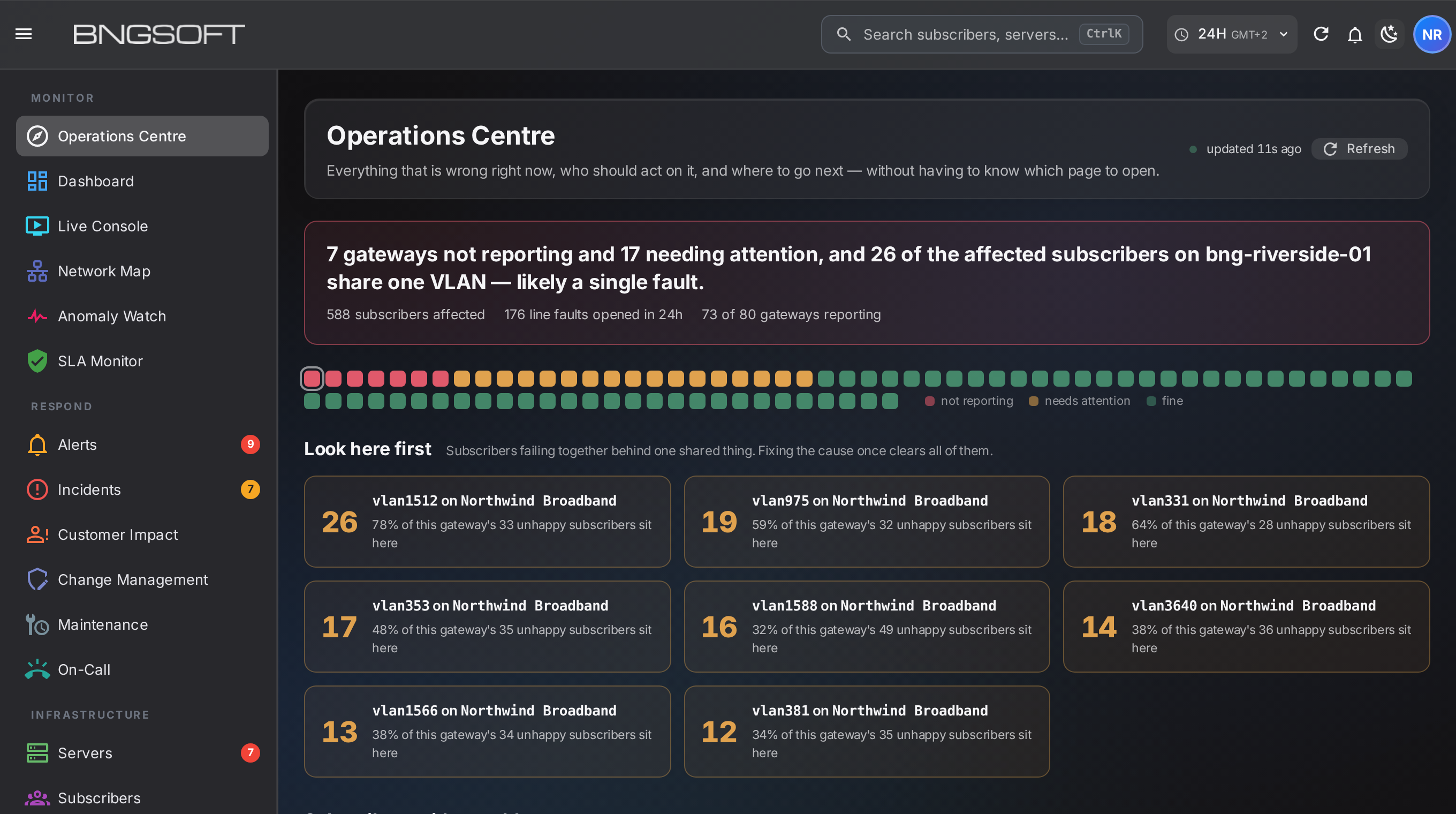
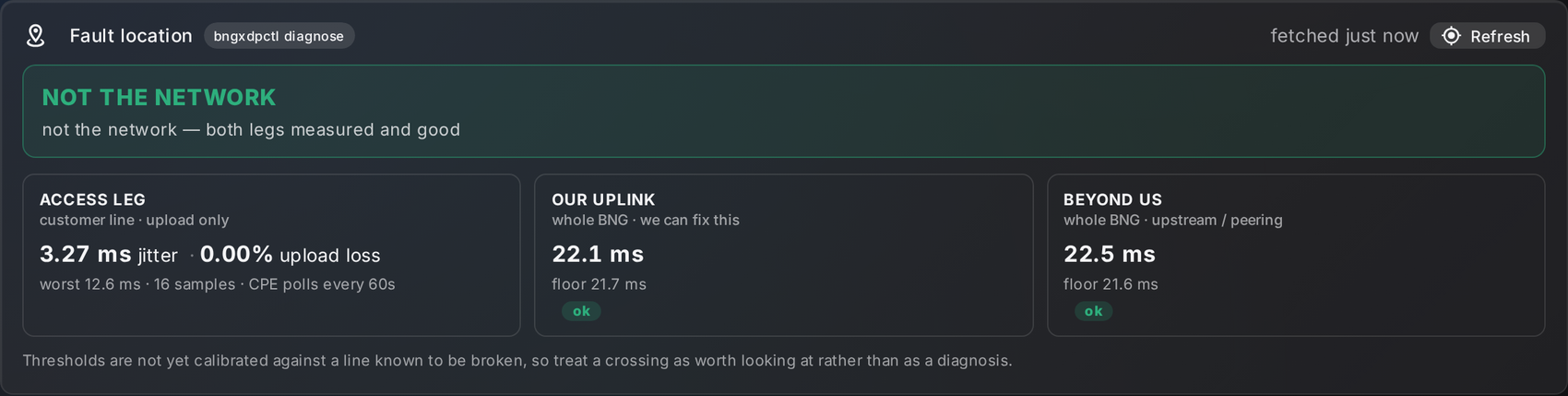
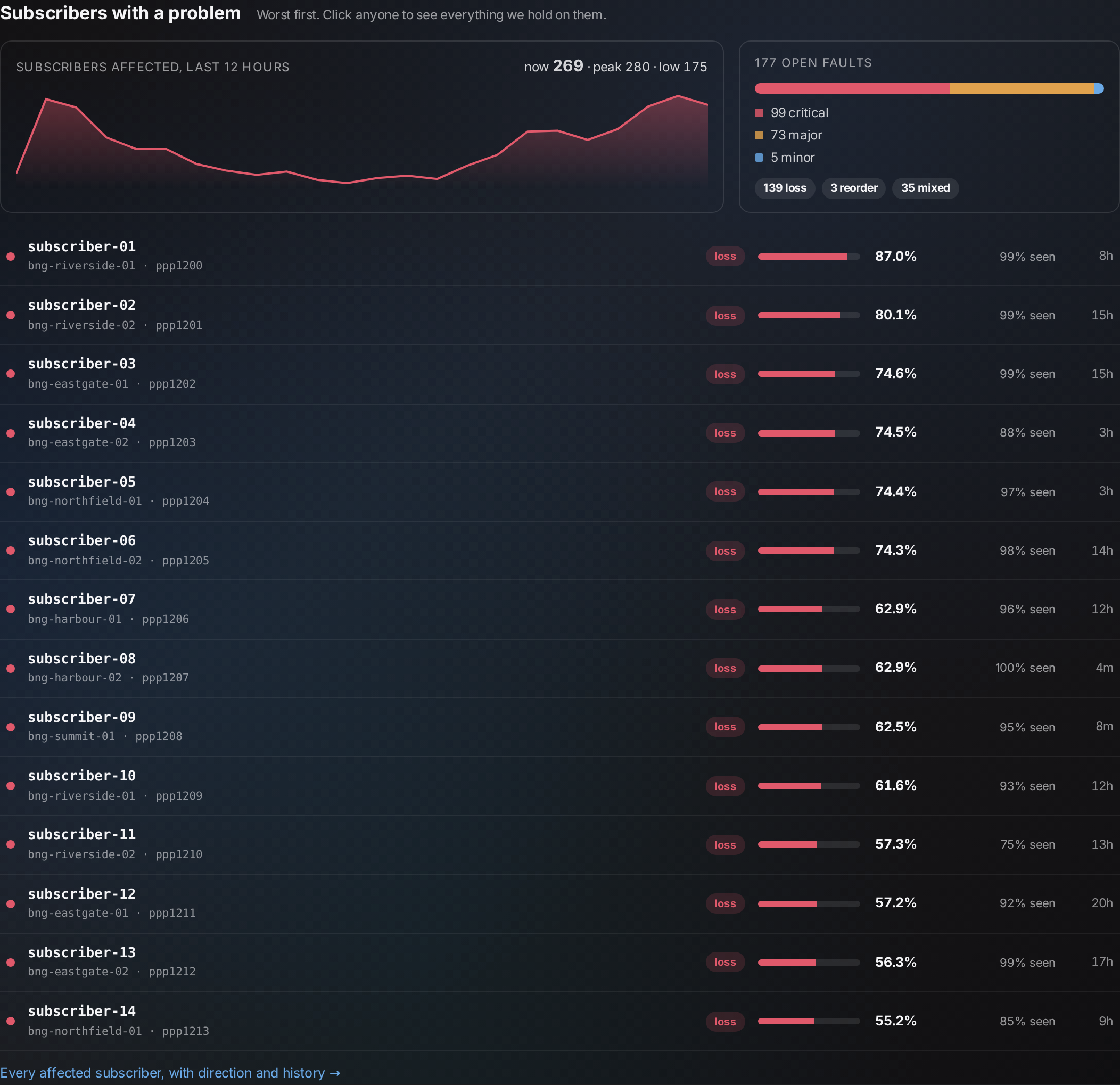
A BNG is only as good as the team running it at 3 a.m. Every OrionOS box reports to NOC2, our operations centre. NOC2 does not show you a wall of graphs. It tells you, in plain words, what is wrong, how many subscribers it touches, and where to look first. The screens below are the product, shown with demonstration data.



16From a new server to live subscribers
A new BNG should not need an engineer on site. The BNGSOFT live installer sets up a server from an install code created in NOC2, over the server's remote console or network boot.
One template, every box
New installs and upgrades use the same configuration template, so a box installed today matches one upgraded last month. Drift is reported, not discovered.
Live updates after install
Session-service and traffic-engine updates deploy without a reboot. A reboot is needed only for a new OS image, in a planned window.
Engineers who wrote the code
When something looks wrong, you talk to the people who build the datapath, with your box's own telemetry already in front of them.
17Beyond the gateway: Internet Observatory, status.bngsoft.com and check.bngsoft.com
"The internet is down" has three suspects: the shared internet, a popular service, or your own access network. BNGSOFT answers the question at three levels: for your NOC, for the public, and for each subscriber. All three are built on the same measurements your OrionOS gateways already take.
Internet Observatory, for your NOC
Internet weather per destination network and city, "Is it down?" for 64 popular services, and Access Health for your own fibre, OLTs and VLANs.
- Slow at 3 or more operators in one city: likely the shared path. Slow at only one: that operator's own path.
- A verdict must hold 4 of the last 6 five-minute windows. No flapping.
- Each service is judged against its own normal, never a fixed number.
- An OLT power cut becomes one event with customer-minutes lost, not 300 disconnect lines.
A public status page people can trust
An anonymous "is it the internet, or is it me?" page for end users and the press, built from many operators' gateways together.
- No operator names, no numbers except times.
- A zone map appears only during a confirmed problem, and never shows where anyone has coverage.
- Says "Not enough data" when it does not know, never "all fine".
- Protected by a self-hosted bot check.
Subscriber self-check, under your brand
The subscriber opens one page. The gateway recognises the line from the live connection, so there is no login, and the page gives one plain answer.
- No name, no address, no device on the page, and no record of the check is kept.
- Router stuck? Check from mobile data with username and a 6-digit PIN.
- "Problem in your area since 21:14" means the customer does not need to phone.
- Rolling out per operator.
The three panels above are illustrative mock-ups of each page; service names and times are examples. status.bngsoft.com and check.bngsoft.com are live; the self-check is enabled per operator.
18Under the hood: the traffic engine and the session service in 7.00
7.00 ships traffic engine bngxdpd 3.8.154 and session service bngsessd 2.0.5, the new name and major version of our session daemon. Most of the work is the kind you never see on a feature list: what happens at a restart, at an upgrade and at 128,000 sessions.
- Starts only on a complete tableAt start-up it waits for the full session list (about 12 s for 65,000 and 28 s for 128,000 sessions) instead of forwarding on a half-filled table.
- Never drops a live user after a short listStale sessions are removed only when the list is known to be complete. Otherwise only sessions whose link is really gone are removed.
- Shows what is really running
bngxdpctl status,statandhealthreport the traffic program actually loaded, and both when it differs from the config. - Safe operator commands
--helpnever runs a command, and commands that change something refuse unknown options. - Counters you can bill onIntel ice 100G statistics no longer go backwards, and accounting counters survive a live restart.
- Measurement built inPer-subscriber loss, latency and fault location come from the same XDP program that forwards the traffic. They feed NOC2 and the Observatory.
- ~400 new subscribers a secondFaster PPP start and stop in kernel 7.3.1, and statistics reads that no longer hold up other network changes. Zero to 65,000 in under 3 minutes.
- Billing IDs that never changeAcct-Session-Id stays the same through a live upgrade or a restart, so RADIUS sees one session, not two.
- Live upgrade at peak128,000 sessions handed over in 24–29 s with 0 flaps.
- IPv6 that stays putAfter an upgrade from an older session service, a prefix that a customer router may still use is held back, never given to someone else.
- Lighter routing tableThe routing daemon no longer holds a link-local route for each PPP or IPoE session.
- Feeds attributionbngipfixd and NOC2 learn who held which address from the session service's live sync stream.
See 128,000 subscribers on one server
We can show the 7.00 lab run live and size a server for your subscriber base, busy-hour traffic and NIC choice.
All figures marked measured come from a BNGSOFT lab server (AMD EPYC 9375F, 32 cores / 64 threads, 128 GB, Intel E810) running the published 7.00 image, with 128,000 emulated PPPoE subscribers and 640 + 640 traffic streams, in November 2026. Figures marked by design describe how the software works. Figures marked planning model are arithmetic. Your results depend on your hardware and traffic.
Product page: BNGSOFT platform · Talk to us